
Investment News Sentiment Analysis Dashboard
Markets move on numbers and narratives. This project is an attempt to make both legible in one place: a single Streamlit dashboard that pairs price + fundamentals with a summarized “news tone” signal—fast enough to be useful, structured enough to be explainable.
If you want to explore it live, the demo is here:
- Dashboard: https://stock-sentiment-dashboard.streamlit.app/
- Repository: https://github.com/m-turnergane/stock-sentiment-dashboard
What I wanted the dashboard to do (and what I explicitly didn’t)
Most retail workflows look like this:
- Open a price chart
- Skim a few headlines
- Bounce between sources
- Leave with a vague feeling, not a decision-ready snapshot
The goal here was to compress steps 2–4 into a single, reviewable artifact:
- Show the “inputs” (headlines) and the “logic” (sentiment labels/scores) so the output isn’t a black box.
- Generate a short, readable market narrative so you don’t have to synthesize ten articles manually.
- Anchor everything next to the price chart and fundamentals to keep sentiment in its proper role: context, not a standalone trading signal.
This is not a price-prediction model. It's a decision-support surface.
Dashboard Screenshots
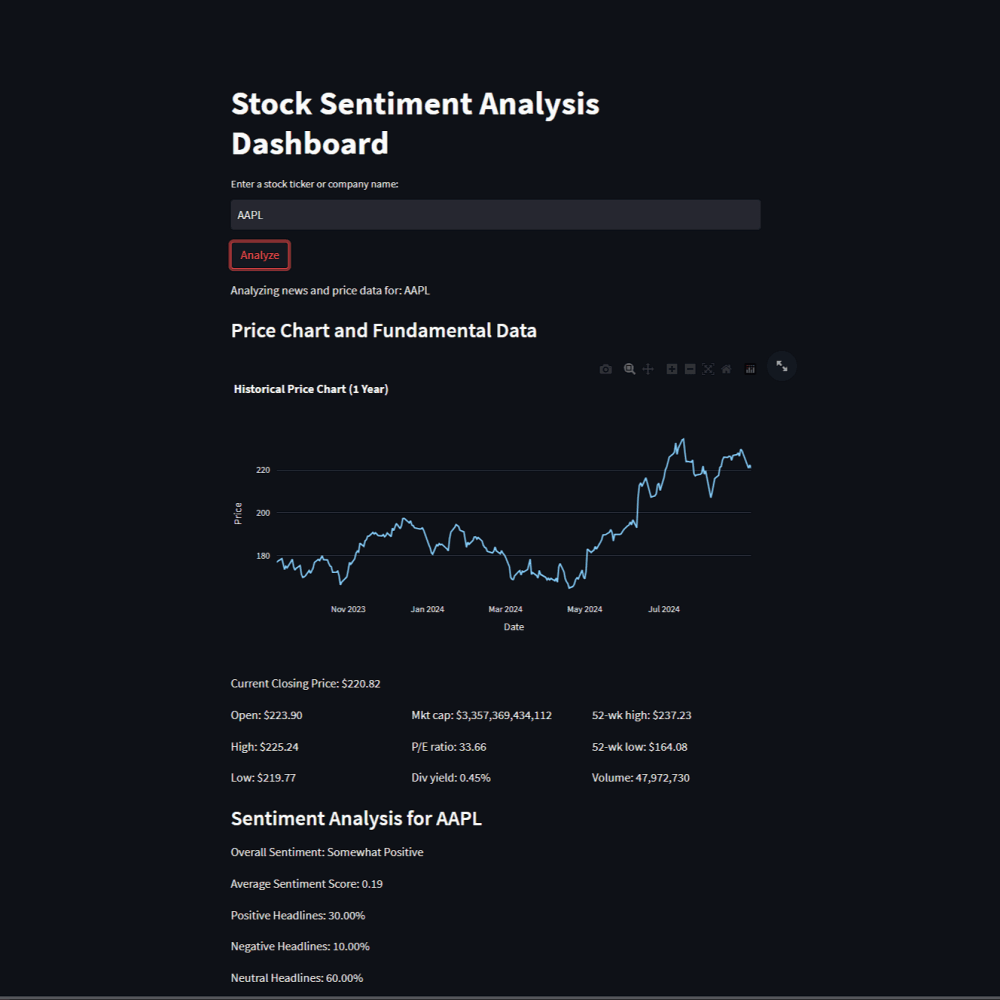
Full dashboard view: price chart, fundamentals, top headlines with sentiment labels, and AI-generated summary in one unified interface.
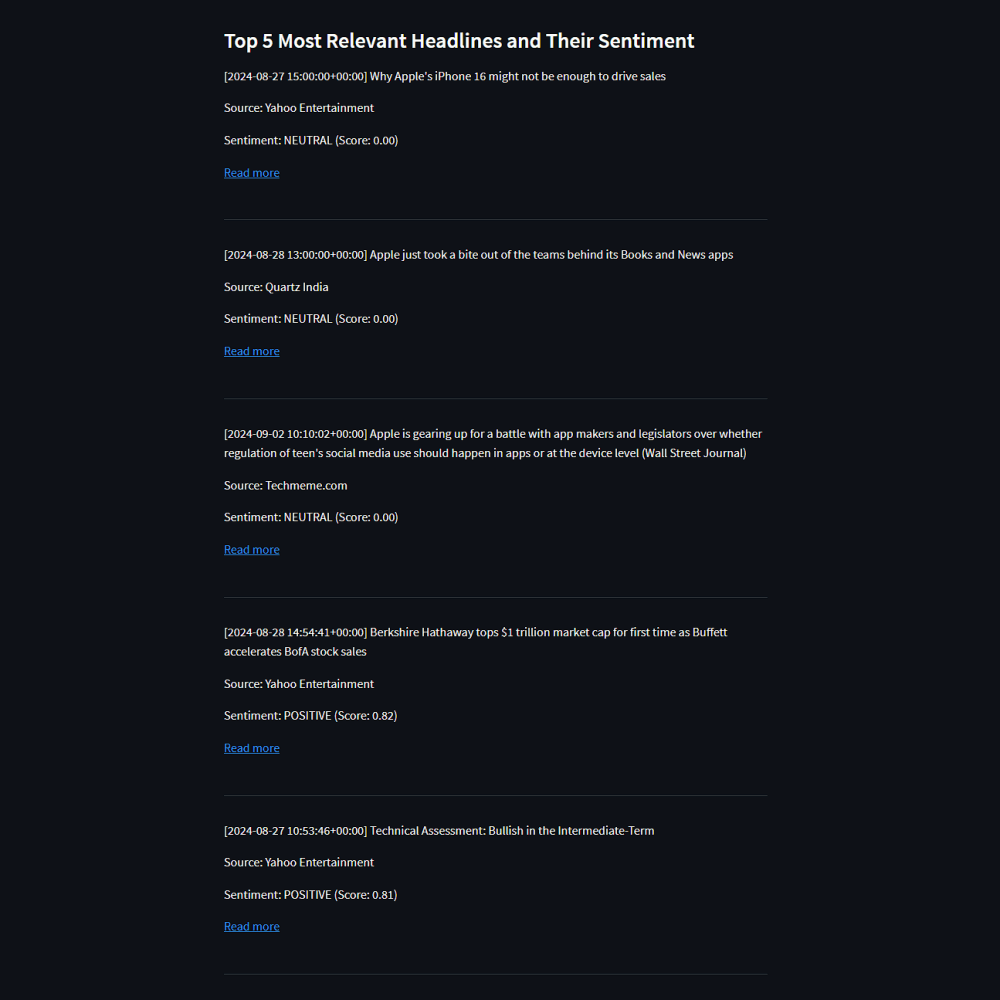
Explainability in action: per-headline sentiment labels (Positive/Negative/Neutral) with confidence scores, so you can audit the overall tone.
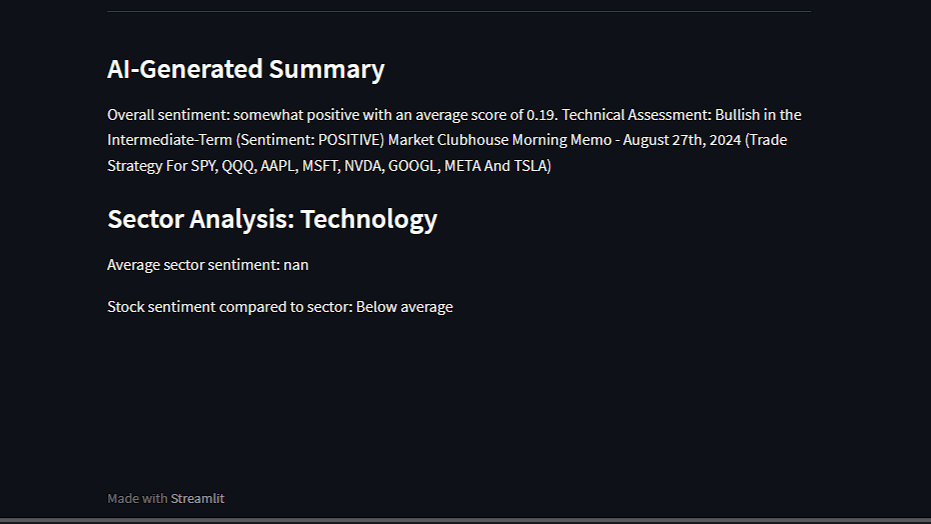
The narrative synthesis layer: BART-generated summary that compresses scattered headlines into a readable market context snapshot.
System design at a glance
Pipeline Architecture
Input normalization → Data retrieval → NLP inference → Presentation
Input
Ticker or company name
Market Data
1Y prices + fundamentals
yfinanceNews Retrieval
Recent article headlines
NewsAPISentiment
Per-headline scoring
FinBERTSummary
Narrative synthesis
BARTDashboard
Unified presentation
Input
Ticker or company name
Market Data
1Y prices + fundamentals
yfinanceNews Retrieval
Recent article headlines
NewsAPISentiment
Per-headline scoring
FinBERTSummary
Narrative synthesis
BARTDashboard
Unified presentation
Combines quantitative (price, fundamentals) and qualitative (news, sentiment) signals in a single view
The pipeline follows a structured flow:
- Input normalization — Accept a ticker or common company name, normalize into a ticker symbol.
- Market data layer — Pull 1Y historical prices + key fundamentals (fast, familiar baseline).
- News retrieval layer — Fetch a small, recent set of relevant articles (bounded by time window + page size) via NewsAPI's "everything" search.
- Sentiment inference — Score each headline using FinBERT (financial-domain sentiment model), producing per-headline label + confidence score.
- Narrative synthesis — Summarize the "bundle" of headlines using a BART summarization model, producing a short digest that matches the dashboard's scanning workflow.
- Presentation layer — Render: chart, fundamentals, top headlines + sentiment, and an AI-generated summary.
The choices that matter (tradeoffs, not just tooling)
| Layer | Why it's there | Tradeoff I accepted |
|---|---|---|
| News pull (bounded window) | Keeps the narrative "fresh" and reduces noise | Fewer articles means missing some context; more articles means latency + cost + dilution |
| FinBERT on headlines | Headlines are short, high-signal, and faster to score | Headline-only sentiment can miss nuance present in article bodies |
| Summarizer on structured input | Converts "10 links" into a digest you can actually read | Summaries can hallucinate if the input is messy; strict input formatting matters |
| Streamlit caching patterns | Keeps the app responsive even with heavyweight models | Cache invalidation becomes a product decision (freshness vs speed) |
| Explainability via per-headline outputs | Lets you audit why the dashboard "feels" positive/negative | More UI surface area; you need to keep it clean and scannable |
If you were productizing this, you'd treat freshness, latency, and explainability as first-class metrics, not afterthoughts.
What “good” looks like when you’re using it
A practical workflow is:
- Enter a ticker (or name)
- Scan the 1Y chart + fundamentals to set baseline context
- Read the top 5 headlines with sentiment labels to sanity-check the tone
- Use the AI summary as your “market narrative” snapshot
- Optionally: compare to sector sentiment if you’re deciding between peers
If you leave the page knowing what the market is talking about and why the tone reads the way it does, the dashboard did its job.
Operational considerations (the unsexy part that makes it real)
A sentiment dashboard lives and dies by reliability:
- API key handling: News retrieval depends on external services (rate limits, downtime, quota management).
- Model cold-start: Transformer models can be slow on first load; caching is not optional if you want a usable UX.
- Failure modes: A resilient dashboard should degrade gracefully:
- no news returned → still show chart/fundamentals
- API error → show a helpful message + retry path
- model load failure → skip summary, preserve the rest
What I’d add in a v2
If I were extending this beyond an MVP:
- Sentiment trendline (headline sentiment over time) rather than a single average
- Source weighting (credibility, recency, relevance scoring)
- Article-body sentiment (not just headlines) for higher fidelity
- Watchlist mode (batch analysis for a set of tickers)
- Exportable report (PDF/markdown snapshot for journaling or review)
Build notes (for builders, not just readers)
- Choose a default “demo ticker” that reliably has news coverage.
- Keep the news window configurable (7–14 days) so you can balance freshness vs stability.
- Treat “average sentiment” as a context signal, not a recommendation engine.
The point of this project isn’t to tell you what to buy.
It’s to reduce time-to-context—without hiding the inputs.